

Overview
After deploying your application to production, you may occasionally need to “impersonate” another user of your application in order to debug problems your customers are reporting. Thankfully, Nova includes built-in functionality to handle this exact scenario.Enabling Impersonation
To enable user impersonation, add theLaravel\Nova\Auth\Impersonatable trait to your application’s User model:
app/Models/User.php
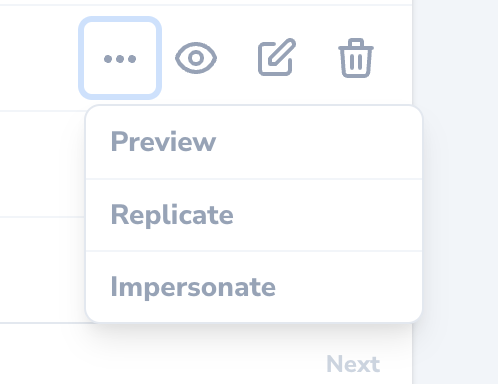
Impersonatable trait has been added to your application’s User model, an “Impersonate” action will be available via the inline action menu for the corresponding resource:
Customizing Impersonation Authorization
By default, any user that has permission to view the Nova dashboard can impersonate any other user. However, you may customize who can impersonate other users and what users can be impersonated by definingcanImpersonate and canBeImpersonated methods on your application’s Impersonatable model:
app/Models/User.php
Inspecting Impersonation State
By resolving an implementation of theLaravel\Nova\Contracts\ImpersonatesUsers interface via Laravel’s service container, you can inspect the current impersonation state of the application:
routes/web.php
Impersonation Events
By default, you add additional customisation by using available events for Impersonations:Laravel\Nova\Events\StartedImpersonatingLaravel\Nova\Events\StoppedImpersonating
boot method of your application’s AppServiceProvider or EventServiceProvider:
app/Providers/EventServiceProvider.php